Student Accounts
1098-T To Do List Upload
Did you know?
You can now upload Student Account documents to your “To Do List” from your MyCWU account Directly from your computer instead of waiting in line, and here’s how:
Step 1
Navigate to your "Student" tab on MyCWU.
Step 2
Under your "To Do List" section, select one of the items on your list:
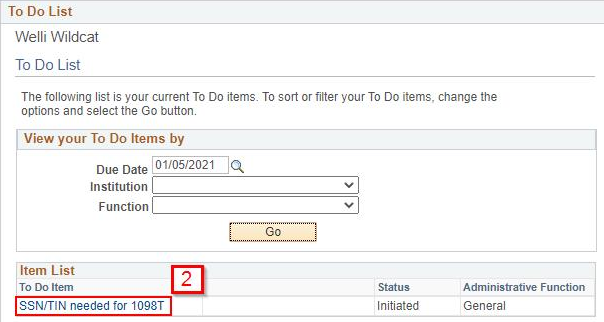
Note: A due date is not required to find your to do list items, however it can help narrow down your search.
Step 3
A window will pop up with an "Add Attachment" button:
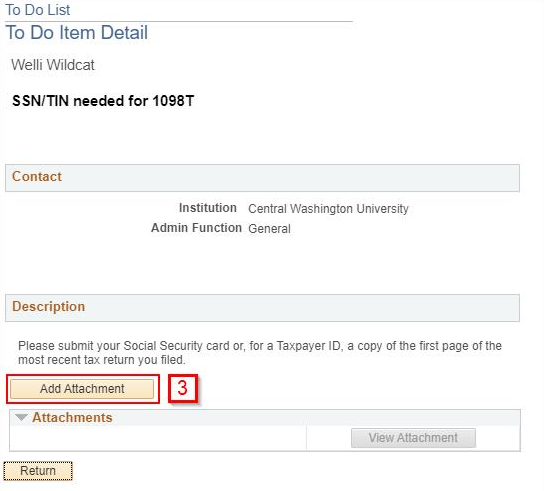
Step 4
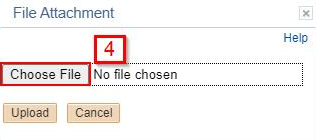
Add your attachment by selecting the correct file from your computer, click upload.
CWU News

Arts and Humanities Month continues to build momentum
October 21, 2026 by David Leder

New position at CWU-Des Moines aimed at improving student experiences
October 21, 2026 by David Leder
Questions? Contact Us.
Student Accounts
Barge 105
Cashiers
Barge 105
(509) 963-2224
Cashiers@cwu.edu
Barge 105
(509) 963-2224
Cashiers@cwu.edu