
Student Accounts
Payment Plan Information-NEW
Flywire Quarterly Pre-Payment Plan
We have made updates to how we process our CWU payment plans.
Education expenses can be easier to manage when spread over predictable monthly payments. Central Washington University offers interest-free payment plans, administered by Flywire, as an alternative to one large payment and may help limit loan borrowing and ease financial pressures. Students and designated authorized users may contribute to a payment plan to pay for eligible student charges.
If you plan to use financial aid or VA benefits with your payment plan, please review the information at the bottom of this page.
When you sign up for the payment plan, you must agree to the information below.
The plan is available during Fall, Winter, Spring, and Summer Quarters.
This plan requires a $50 non-refundable enrollment fee.
- Convenient 3- & 2-month payment plan options. See Payment Plan schedule for enrollment and due dates.
- 24/7 account access to view and manage active payment plans via
- The ability for students to add one or more authorized users to have access to their account to make payments toward a payment plan.
- Flexible support options: Student Accounts at StudentAccounts@cwu.edu
If a balance remains on my Student Account after the final installment due date has passed, a $30.00 defaulted payment plan fee will be assessed.
Payment Plan Set Up
Enrolling in a payment plan is simple, and students can quickly set up a payment plan
Through their MyCWU student dashboard by following the steps below.
- Once logged into MyCWU, navigate to the Payment Plans tab to view the payment plan options available to you.

- Select the payment plan option that best meets your needs.
- Add your preferred payment method and activate the plan by immediately paying the non-refundable enrollment fee of $50.
- The plan installment dates will be automatically populated for you.
- Monthly installments will be debited from your saved payment method automatically on the due date each month. You will receive email reminders of upcoming payments.
- For international payments, the student has to initiate these payments manually, each month.
- Log in to MyCWU at any time to manage active payment plans, including viewing the status of or changing your payment plan, making a partial or full payment towards your remaining balance, or updating autopay details.
Payment plan enrollment will reflect on your student dashboard via a banner at the top during the open enrollment period:
Fall 26 Enrollment Dates:
- 9/1-9/15 installments 9/15, 10/15, 11/15
- Or 2 installments 9/15, 10/15
- 9/16-10/15 installments 10/15, 11/15
Winter 27 Enrollment Dates:
- 12/1/26-12/15 installments 12/15, 1/15, 2/15
- Or 2 installments 12/15, 1/15
- 12/16-1/15 installments 1/15, 02/15
Spring 27 Enrollment Dates:
- 3/1-3/15 installments 3/15, 4/15, 5/15
- Or 2 installments 3/15, 4/15
- 3/16-4/15 installments 4/15, 5/15
Summer 27 Enrollment Dates:
- 6/1-6/15 installments 6/15, 7/15, 8/15
- Or 2 installments 6/15, 7/15
- 6/16-7/15 installments 7/15, 8/15
Adding Authorized Users
*Please note that AU's cannot set up a payment plan, but can make payments towards the plan*
Through MyCWU you are able to grant one or more authorized users’ access to your financial information, including the ability to view charges on your account, pay your bill, or pay a payment plan installment on your behalf. An authorized user can be parent/guardian, family member, employer, or any other person you wish to have access to your account.
Establish Authorized Users
Adding an authorized user to your account is quick and easy. Simply login to your MyCWU account and navigate to tab labeled "Financial" on the left side of your student dashboard, click "Quarterly Payment Plan". Once in Flywire follow these step-by-step instructions:
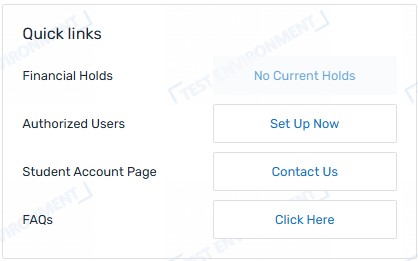
- Click Set Up Now under Quick Links.
- Click Add Authorized User to add a new Fill in the necessary information, including basic contact information and your relationship to the authorized user then click Create.
- The authorized user will receive an email with instructions on how to log in to the system to verify their authorized user account. Please ensure the email address you enter is correct, or your authorized user will not receive important email messages from our office.
- Once you have added one or more authorized users to your account, you also have the ability to view the authorized user’s activity and/or delete authorized users by revoking access to their account via the Manage Authorized Users under Manage Now under Quick Links.
Resetting a Password for an Authorized User
Only the authorized user can reset the password for their account. Neither the student nor Student Accounts can perform this action. Simply navigate to Flywire and click Forgot Password. If the authorized user is unable to reset their password, it may be necessary for the student to remove the current authorized user account and establish a new one.
If you are using Financial Aid or VA Benefits, please first review the following information:
If you are using Financial Aid:
Sometimes your financial aid will not show as “pending” on your student account. When this happens, the payment plan system may ask for a larger first installment payment because it does not yet recognize that aid is coming.
Common reasons financial aid may not be showing as pending include:
- You are not enrolled full-time (12 credits for undergraduates/10 credits for graduate students). If you are wait listed for a class, it will not be counted in your total enrolled credits.
- You are not meeting Satisfactory Academic Progress (SAP) requirements from the previous quarter.
- There are items on your Financial Aid To-Do List (missing documents, FAFSA/WASFA issues, verification items, etc.
Once financial aid is updated and shows as pending on your account, the payment plan will recalculate automatically. This means your future installments may go down if more aid applies, or can increase if aid applies at a lower amount than expected.
If you are expecting Financial Aid but don’t see them listed as pending yet, it may be a good idea to contact the Office of Financial Aid & Scholarships directly to ensure that everything is order with your aid amounts.
If you are using your VA Benefits and are waiting for VA payment and/or the housing stipend (and you’ve already submitted your VA benefit eligibility documentation) please note that:
Payment plan due dates cannot be changed or delayed to accommodate the pending payments/waivers. Monthly payments might be higher at first until the VA payments or waivers are applied to your account then the payment plan will recalculate automatically
- If you are using Chapter 31 Veteran Readiness & Employment or Chapter 33: Post-9/11 GI Bill® benefits at the 100% coverage level for tuition (not living in on campus housing) and the VA is expected to pay all charges in the term, you do not need to take any action at this time.
- As a reminder, the VA only pays for tuition and eligible fees for required courses.
- Eligible fees are course fees, lab fees, and tuition overload fees.
- If you are using Chapter 33: Post-9/11 GI Bill® at less than 100% coverage level, you are responsible for the uncovered portion of tuition and mandatory fees, as well as any fees that are not covered by the VA.
- If you have any questions about your veterans’ benefits, contact the CWU Veterans Center directly at VA@cwu.edu.
CWU News

Arts and Humanities Month continues to build momentum
October 21, 2026 by David Leder

New position at CWU-Des Moines aimed at improving student experiences
October 21, 2026 by David Leder
Questions? Contact Us.
Student Accounts
Barge 105
Barge 105
(509) 963-2224
Cashiers@cwu.edu